
How to Block an Experiment After You've Already Designed It
Part of our complete guide to DOE for biologists.
You've already generated a design and you're staring at the run list when it hits you: there's no way one analyst is getting through all of this alone, or these runs need to be split across two lab days. Most DOE guidance assumes you knew this before you designed the experiment. BioDOE doesn't require that.
Why this comes up after the fact
Blocking — grouping runs by whatever varies outside your actual factors (which analyst ran it, which day, which reagent lot) — is usually taught as something you plan for upfront, because the classic approach is to replicate the entire design once per block. That works, but it assumes you already know you'll need blocks before you've even generated the run list.
In practice, the need to split work across people, days, or equipment often comes up only once you see how many runs you're actually looking at. Re-planning the whole design at that point is a lot of friction for what's really just a logistics problem, not a change to what you're studying.
Splitting an existing design into blocks
Once you've generated a design, Split into Blocks (in Panel 2) partitions the runs you already have — no re-planning, no extra runs added. Tell it what varies (e.g. "Analyst") and how many blocks you need; you're the one who knows the real constraint, so BioDOE doesn't guess it for you.
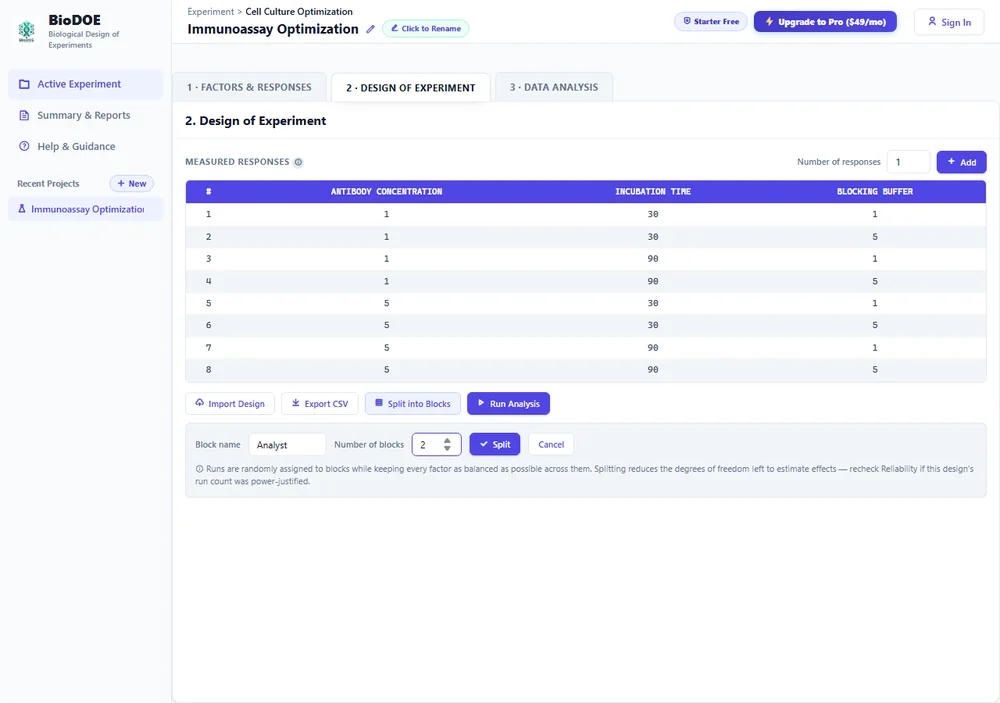
Click Split, and your runs are grouped into contiguous blocks — Block 1's runs together, then Block 2's — with an editable name for each block and a balance report showing how evenly every factor landed across them.
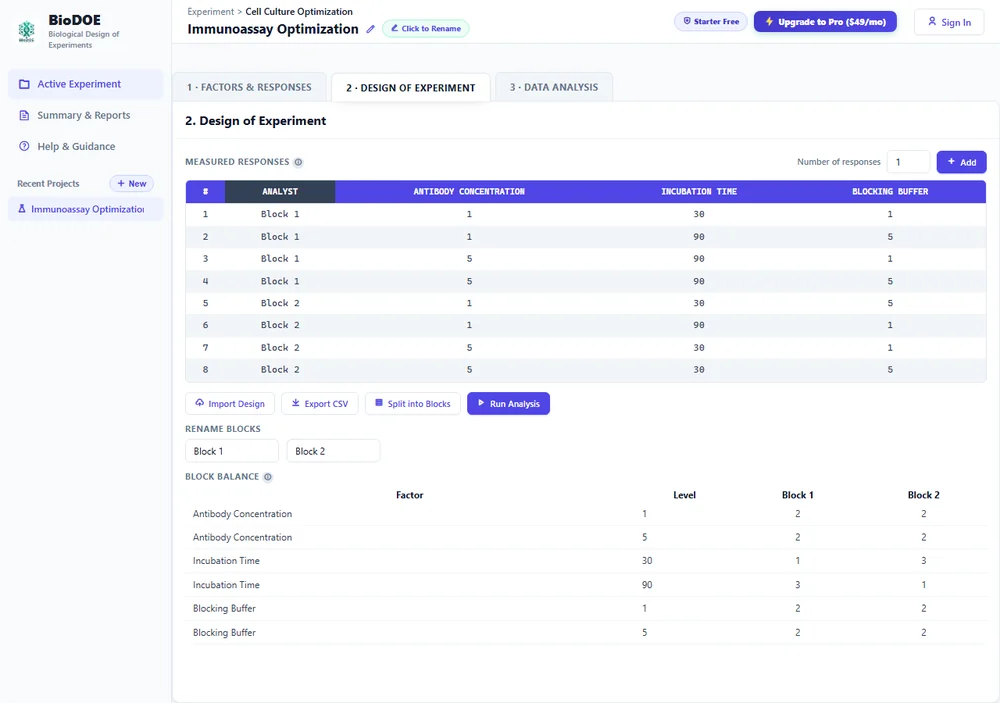
Runs aren't just split arbitrarily — they're assigned using a balancing method (minimization, borrowed from clinical trial randomization) that actively keeps every factor as evenly distributed across blocks as it can, rather than hoping a random split happens to work out. The balance report is there so you can actually check that, not just take it on faith.
The catch: blocking costs you degrees of freedom
Splitting into blocks isn't free. Every block boundary you introduce is another thing the model has to account for, which means less of your data is left over to estimate the effects you actually care about. A design that had just enough runs to detect a real effect might not have enough left over once you've also blocked it — this is exactly the tradeoff the feature's own warning calls out.
If you power-justified your original run count with the Reliability Check, it's worth revisiting it after blocking, not just before generating the design. Fewer available degrees of freedom means the same design may no longer hit the power you originally planned for.
What this replaces
Pre-planned blocking (deciding on blocks before generating a design, so the whole design repeats once per block) isn't a separate option in BioDOE anymore — post-hoc splitting covers both cases. If you already know before you start that you'll need blocks, generate the design first, then split it; the outcome is the same balanced grouping either way, and you get to see the actual run list before committing to how it's divided.