
Reading Your ANOVA Table and Pareto Chart
Part of our complete guide to DOE for biologists.
Running the analysis is the easy part. Knowing what the significance table and Pareto chart are actually telling you is where most of the value — and most of the confusion — lives. Here's what to look at, using a real result from a screening run.
Start with the significance table
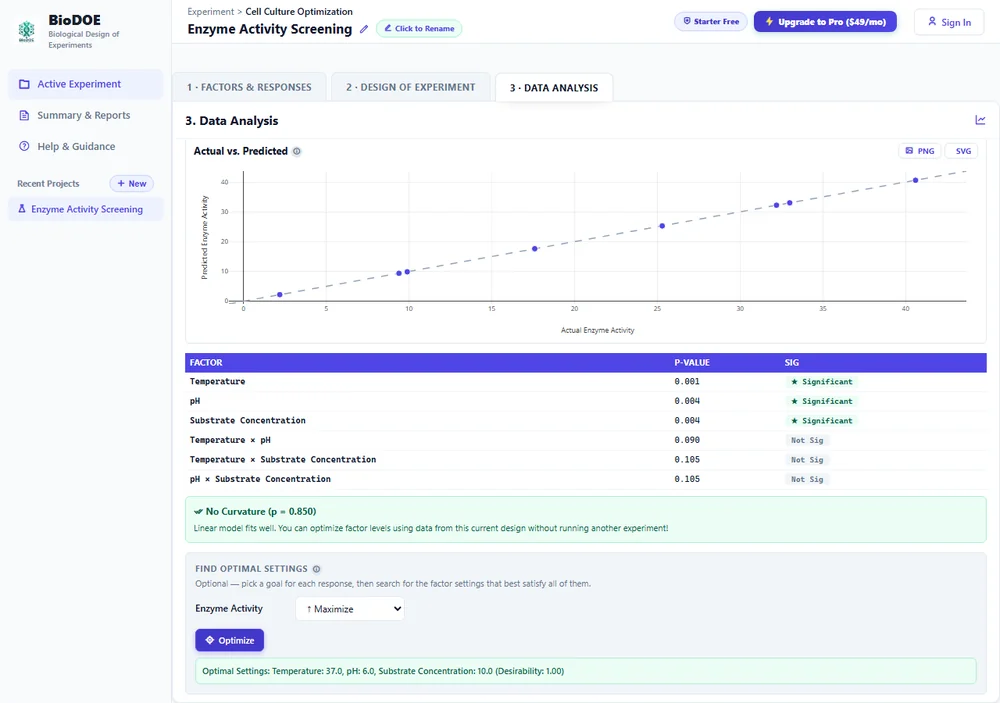
Each row is one factor (or interaction between factors). Two columns matter most:
- p-value — the probability you'd see an effect this large if the factor genuinely did nothing at all. Smaller means the effect is less likely to be a fluke.
- Sig — a shortcut for "p < 0.05," the conventional line for calling something statistically significant. It's a convention, not a law of nature; treat a p-value of 0.049 and 0.06 as roughly the same strength of evidence, not a hard pass/fail.
In this run, Temperature, pH, and Substrate Concentration are all significant. Their interactions (Temperature × pH, and so on) aren't — which tells you these factors act independently here, not that they don't matter alone.
The Pareto chart shows you the same thing, ranked
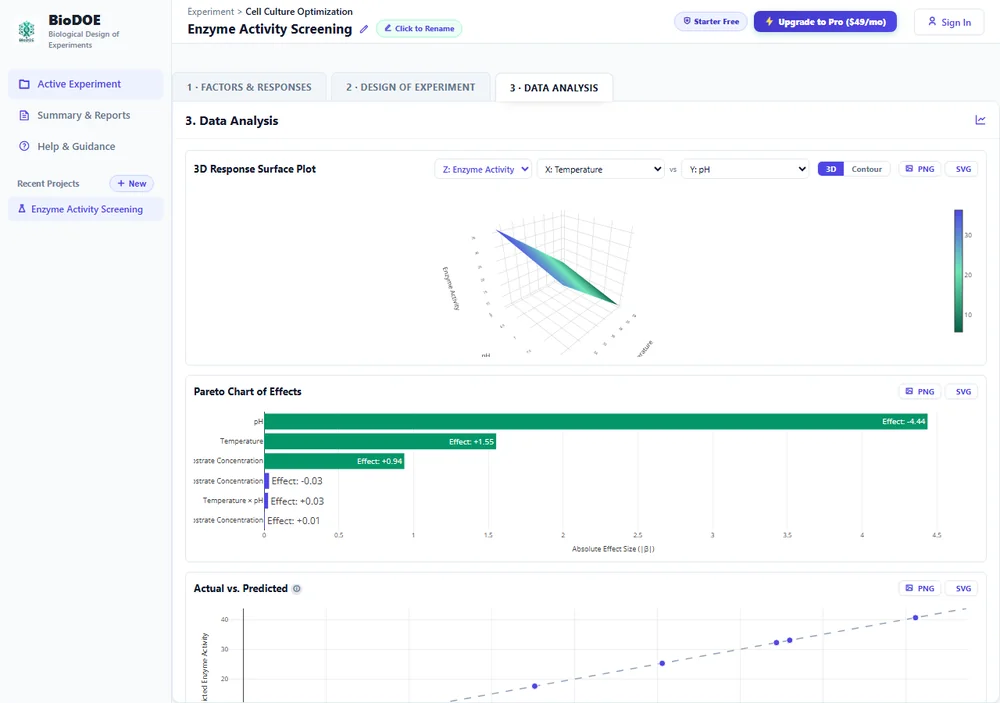
The Pareto chart is the significance table turned into a picture: bars sorted by absolute effect size, colored by significance (green means p < 0.05). Two things worth reading correctly:
- Length isn't the same as significance. A long bar with a lot of run-to-run noise behind it can still fail to be significant; a short bar measured very precisely can pass. The color tells you significance; the length tells you magnitude. You want both.
- The sign matters, not just the size. The chart shows effect labels like "+1.55" or "-4.44" — positive means increasing that factor increases the response; negative means the opposite. In this example, pH has the largest effect and it's negative: lower pH drove enzyme activity up, not down.
Actual vs. Predicted: does the model even fit?
Before trusting either chart, check this one. Every point is one real run, plotted as where the model predicted it would land against where it actually landed. Points hugging the diagonal dashed line mean the model explains your data well; a scattered cloud means something structural is off — a missed interaction, an outlier run, or a factor that matters more than a straight line can capture.
Don't read significance off a model that doesn't fit. If Actual vs. Predicted looks scattered, that's the first thing to fix, before trusting which factors came back significant.
Curvature: the check that tells you if you're done
A "No Curvature" result (shown in the first screenshot above) means a straight-line model already explains your data — you can go straight to optimizing without running more experiments. If curvature is detected instead, it means the true relationship bends somewhere your current design can't see, and BioDOE will offer to augment it into a full Response Surface design rather than asking you to start over.
Putting it together
A result you can act on looks like: an Actual vs. Predicted plot that hugs the diagonal, a Pareto chart where the significant (green) bars are the ones you'd expect or find interesting, and a curvature check that tells you whether you're ready to optimize or need one more design first. If any of those disagree with each other — say, low R² but several "significant" factors — that's usually a sign to look at the raw data before trusting the conclusion.